Webhooks
Webhooks allow you to receive real-time notifications when events occur in your Eirly account. Instead of polling the API, webhooks push data to your application as events happen.
Available Events
Webhooks are triggered for the following events:
referral.created- Fired when a new referral is createdreferral.updated- Fired when a referral is updatedreferral.billing_failed- Fired when the billing failed for the REST api requestreferral.pending_verification- Fired when the profile requires completion before referral can be issuedreferral.complete- All results are completed for this referralreferral.insufficient_data- Unable to proceed with completion on this referralreferral.refunded- If the referral was refundedreferral.failed_test- If a test on the referral failed and resulted in a new referral being requiredreferral.partial_results- We have partial results for this referral, can be fired multiple times.referral.transferred- If the original referral was transferred to another personreferral.issued- The referral has been issued to the customerreferral.scheduled_reissue- The referral is about to be reissued to another customerresult.created- Fired when a result is createdresult.updated- Fired when a result is updatedresult.complete- All results completedresult.in_review- The results are in review with the org, and will be released upon reviewresult.partial_results- We have partial results for this result.collection_centres.updated- The collection centre list changed: at most once per weekly refresh, and only when a centre opened, changed, went missing, came back or was retired. See Collection Centre Events.
Setup
You can set up webhooks in the portal or over the REST API. Both manage the same webhooks: one created over the API appears in the portal, and the reverse.
In the portal
Configure webhooks in your organisation settings page: Organisation => Settings => Api Keys
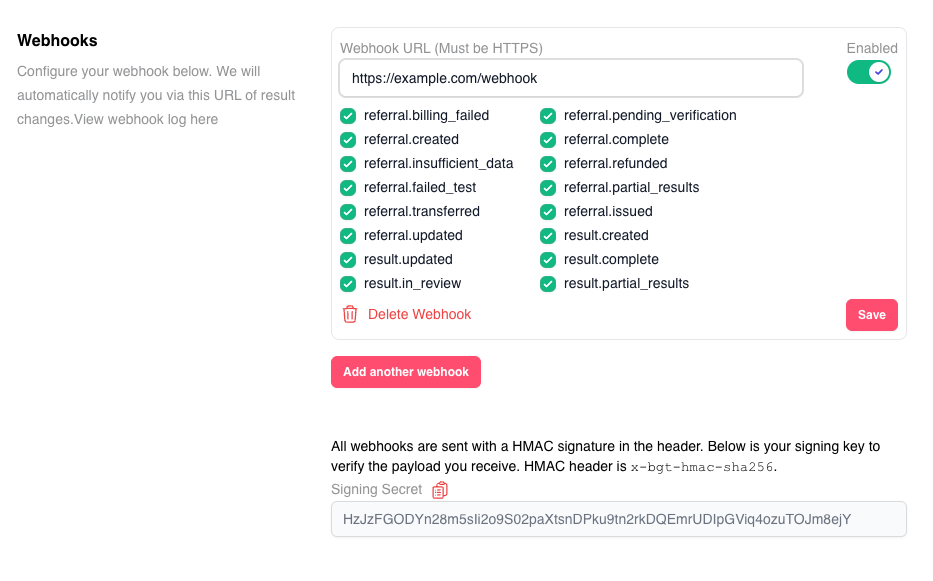
To configure a webhook:
- Navigate to Organisation Settings > API Keys
- Enter your webhook endpoint URL
- Select the events you want to receive
- Save your configuration
Webhooks become available once the API is enabled for your organisation, on the same page.
Over the API
Create, list, update and delete webhooks with the
Webhooks endpoints, using the same access token as the rest
of the API. GET /v1/webhook-events lists the event names you can subscribe to.
The signing secret is not returned over the API: copy it from the portal (see
Security).
Creating a webhook, pointing it at a different URL, or deleting it over the API emails your organisation's owners and everyone who can manage webhooks, so a change nobody expected is noticed. Pausing a webhook or changing its events doesn't.
Rules for every webhook
- The URL must use
httpsand must be publicly reachable. URLs pointing at a private or internal address are refused when you save. - An event can be sent to a given URL by only one of your webhooks. You can use a single URL for all events, or different URLs for different events, but subscribing the same event to the same URL twice is refused: it would deliver every event twice.
- A webhook can be inactive: it keeps its URL and events but receives nothing until you activate it again.
Receiving Webhooks
Endpoint Requirements
Your webhook endpoint must:
- Respond within 3 seconds - Longer responses will be considered failed
- Return a 2xx HTTP status code - Any other status code triggers a retry
- Use HTTPS - Required. A webhook with an
httpURL cannot be saved - Be publicly accessible - Eirly servers must be able to reach your endpoint
Event Ordering
Events are delivered in order per entity. For example:
- You will always receive
referral.createdbeforereferral.updatedfor the same referral - You will always receive
result.createdbeforeresult.updatedfor the same result
If a webhook fails to deliver, all subsequent webhooks for that specific entityUuid will be queued until the failed webhook is successfully delivered or exhausts all retry attempts.
Retry Strategy
If webhook delivery fails, Eirly will retry according to this backoff schedule:
| Attempt | Delay after the previous attempt | Formula |
|---|---|---|
| 1 | Immediate | Initial attempt |
| 2 | About 1 minute | 1² minutes |
| 3 | About 4 minutes | 2² minutes |
| 4 | About 9 minutes | 3² minutes |
| 5 | About 16 minutes | 4² minutes |
Formula: after the Nth failed attempt, the next is scheduled N² minutes later. Retries are picked up once a minute, so each can land up to a minute after its scheduled time. The whole schedule spans about 30 minutes.
After 5 failed attempts, the webhook will no longer be retried and you'll need to poll the API to retrieve the missed data.
Security
Webhook Signatures
Every webhook request includes an x-bgt-hmac-sha256 header containing an HMAC signature of the payload. This signature allows you to verify that the webhook was sent by Eirly and hasn't been tampered with.
Always verify webhook signatures in production to prevent unauthorized requests to your endpoint.
Verifying Signatures
Use your API secret key to verify the signature:
Node.js Example:
const crypto = require("crypto");

function verifyWebhookSignature(payload, secretKey, signature) {
  // Calculate expected signature
  const expectedSignature = crypto
    .createHmac("sha256", secretKey)
    .update(payload)
    .digest("hex");

  // Use timingSafeEqual to prevent timing attacks
  return crypto.timingSafeEqual(
    Buffer.from(expectedSignature, "hex"),
    Buffer.from(signature, "hex")
  );
}

// Usage in an Express endpoint
app.post(
  "/webhooks/bgt",
  express.raw({ type: "application/json" }),
  (req, res) => {
    const signature = req.headers["x-bgt-hmac-sha256"];
    const payload = req.body.toString();

    if (
      !verifyWebhookSignature(payload, process.env.BGT_SECRET_KEY, signature)
    ) {
      return res.status(401).send("Invalid signature");
    }

    // Process webhook
    const event = JSON.parse(payload);
    // ... handle event ...

    res.status(200).send("OK");
  }
);
Python Example:
import hmac
import hashlib

def verify_webhook_signature(payload: bytes, secret_key: str, signature: str) -> bool:
    expected_signature = hmac.new(
        secret_key.encode(),
        payload,
        hashlib.sha256
    ).hexdigest()

    return hmac.compare_digest(expected_signature, signature)
Webhook Headers
Each webhook request includes the following headers:
| Header | Description | Example |
|---|---|---|
x-bgt-hmac-sha256 | HMAC signature for payload verification | a1b2c3d4... |
x-bgt-delivery-time | Server-side timestamp of when the event was sent | Sun, 28 Sep 2025 23:41:01 GMT |
Content-Type | Always application/json | application/json |
Important Considerations
Scope
- Webhooks fire for all referrals/results in your organisation
- Currently includes only API-created orders
- Future updates will include UI and store integration orders
API Limitations
- The API currently only returns referrals/results created via the API
- Future updates will allow querying all referrals/results regardless of creation method
Idempotency
Handle duplicate webhook deliveries gracefully. Use the eventUuid to ensure you only process each event once:
const processedEvents = new Set(); // Or use a database

app.post("/webhooks/bgt", async (req, res) => {
  const event = req.body;

  // Check if already processed
  if (processedEvents.has(event.eventUuid)) {
    return res.status(200).send("Already processed");
  }

  // Process event
  await handleEvent(event);

  // Mark as processed
  processedEvents.add(event.eventUuid);

  res.status(200).send("OK");
});
Event Payloads
All webhook events follow a consistent structure with an event wrapper containing the data payload.
Base Structure
{
  "eventName": "event.type",
  "eventUuid": "unique-event-id",
  "version": "1.0",
  "data": {
    /* Event-specific data */
  }
}
Future versions will include:
- Metadata from referrals in result payloads for easier correlation
- Additional event types
- Enhanced payload information
Referral Events
Fired when referrals are created or updated.
referral.created
{
  "eventName": "referral.created",
  "eventUuid": "98603d91-9d1b-4607-8ecb-705b33c66ef0",
  "version": "1.0",
  "data": {
    "uuid": "b69ff810-0823-41ee-8fd2-43ff01329fae",
    "status": "ISSUED",
    "issuedAt": "2025-09-17T05:35:20.942Z",
    "metadata": null,
    "createdAt": "2025-09-17T05:35:15.810Z",
    "reference": "DBK4EM3H",
    "updatedAt": "2025-09-17T05:35:20.942Z",
    "profileUuid": null,
    "organisationUuid": "dbea642f-b741-4d33-ba7b-10fd0229a961"
  }
}
referral.updated
Same structure as referral.created with updated field values.
Referral Statuses
| Status | Description |
|---|---|
PENDING_VERIFICATION | Profile requires completion before referral can be issued |
CREATED | Referral has been created but not yet issued |
ISSUED | Referral has been issued and sent to the patient |
SCHEDULED_REISSUE | Referral is scheduled to be reissued to another customer |
PARTIAL_RESULTS | Partial results available for this referral (can occur multiple times) |
COMPLETE | All results are completed for this referral |
INSUFFICIENT_DATA | Unable to proceed with completion due to insufficient data |
REFUNDED | Referral has been refunded |
FAILED_TEST | Test failed and a new referral is required |
BILLING_FAILED | Billing failed for the REST API request |
TRANSFERRED | Referral was transferred to another person |
Result Events
Fired when test results are created or updated.
result.created
{
  "eventName": "result.created",
  "eventUuid": "fd618482-7463-49dd-baa7-4289c62b0139",
  "version": "1.0",
  "data": {
    "uuid": "89dd5014-750c-48c2-8f39-c39a34a4a637",
    "status": "CREATED",
    "metadata": null,
    "createdAt": "2025-09-17T08:01:27.616Z",
    "updatedAt": "2025-09-17T08:01:27.641Z",
    "profileUuid": null,
    "referralUuid": "ffc14dd3-7216-4f52-900f-360733183142",
    "organisationUuid": "dbea642f-b741-4d33-ba7b-10fd0229a961"
  }
}
result.updated
Same structure as result.created with updated field values. This event fires when:
- Biomarker data becomes available
- Result status changes
- Results are reviewed or finalized
Result Statuses
| Status | Description |
|---|---|
CREATED | Result record created, awaiting data |
IN_REVIEW | Results are in review with the organisation, pending release |
PARTIAL_RESULTS | Partial results are available (can occur multiple times) |
COMPLETE | All results finalized and available |
Collection Centre Events
Fired after the weekly refresh of collection centres, when it changed anything. Unlike the events above, it is not about one of your records: it tells you the shared list of centres changed, and which ones, so you can update a copy you keep.
- At most one per refresh, with every lab's changes in it, and none in a week where nothing changed.
- It names centres, not their details. Fetch them with
?uuids=(up to 100 per request), one at a time, or everything the refresh changed withchangedSince. Every uuid a delivery names can be fetched, retired ones included. - Every changed centre is listed, however many. A normal week names a few dozen. After a change that touches many centres at once, a delivery can reach about 250 KB, so make sure your endpoint accepts a body that size: some defaults do not (Express's
express.json()stops at 100 KB unless you raiselimit).
collection_centres.updated
{
  "eventName": "collection_centres.updated",
  "eventUuid": "9c2c7ec0-1b5e-4f0a-a3c7-2d9e8b6f4a11",
  "version": "1.0",
  "data": {
    "runUuid": "a8fcba04-46c1-4d06-9fdc-eee2a69aed24",
    "ranAt": "2026-09-27T16:00:00.000Z",
    "counts": { "created": 1, "updated": 3, "revived": 1, "missing": 0, "retired": 0 },
    "changed": {
      "created": ["6274097e-58d1-4c0a-9f7b-3a1e2d4c5b60"],
      "updated": [
        "e36e14e4-2535-4ac3-92f0-c63a369dc047",
        "cbec9dd4-55f5-4cc6-b987-4320a202e434",
        "e8414022-bd90-4793-9502-9543e2f49d11"
      ],
      "revived": ["44ad5e41-f8a7-4ba6-8321-a2b7df1bb5ff"],
      "missing": [],
      "retired": []
    }
  }
}
| Field | Description |
|---|---|
runUuid | The refresh that made these changes. A retried delivery carries the same one. |
ranAt | When that refresh recorded its changes. Pass it as changedSince to fetch exactly what it changed. |
counts.created | New centres. |
counts.updated | Centres whose details changed: name, address, phone, notes, services, booking link, opening hours and so on. A change of opening hours alone counts. |
counts.revived | Centres back after going missing. One that came back with new details is in both revived and updated. |
counts.missing | Centres that dropped out of their lab's listing this week. Still returned by the API, with status: "MISSING"; usually a hiccup on the lab's side. |
counts.retired | Centres missing for three weeks. No longer returned by default; changedSince returns them with status: "RETIRED" so you can remove them. |
changed | The uuids of every changed centre, in the same five lists as counts. |
To apply one:
async function handleCollectionCentresUpdated(event) {
  // Everything the refresh changed, retired centres included.
  const url = `https://api.eirly.health/v1/collection-centres?changedSince=${event.data.ranAt}&count=10000`
  const response = await fetch(url, { headers: { Authorization: `Bearer ${accessToken}` } })
  const { collectionCentres } = await response.json()

  for (const centre of collectionCentres) {
    if (centre.status === 'RETIRED') remove(centre.uuid)
    else upsert(centre)
  }
}
If you miss a delivery, nothing is lost: the next changedSince query, from the time of your last sync, returns everything since.
Retrieving Full Data
Webhook payloads contain minimal data. To get complete referral or result details including biomarkers:
async function handleResultUpdated(event) {
  const resultUuid = event.data.uuid;

  // Fetch full result data from API
  const response = await fetch(
    `https://api.eirly.health/v1/results/${resultUuid}`,
    {
      headers: {
        Authorization: `Bearer ${accessToken}`,
      },
    }
  );

  const fullResult = await response.json();
  // fullResult includes biomarkers array
}
Testing Webhooks
Local Development
Use tools like ngrok to expose your local server:
ngrok http 3000
Use the generated HTTPS URL as your webhook endpoint during development.
Webhook Logs
Monitor webhook delivery in your Eirly organisation settings. Logs show:
- Delivery attempts
- Response codes
- Retry status
- Failure reasons
Best Practices
- Respond quickly - Acknowledge receipt immediately (200 OK), then process asynchronously
- Verify signatures - Always validate the HMAC signature in production
- Handle duplicates - Use
eventUuidfor idempotency - Implement retries - Handle transient failures gracefully
- Monitor failures - Set up alerts for webhook delivery failures
- Use HTTPS - Encrypt webhook data in transit
- Log events - Keep audit logs of received webhooks
Example Implementation
Complete webhook handler example:
const express = require("express");
const crypto = require("crypto");

const app = express();

// Use raw body for signature verification
app.post(
  "/webhooks/bgt",
  express.raw({ type: "application/json" }),
  async (req, res) => {
    try {
      // Verify signature
      const signature = req.headers["x-bgt-hmac-sha256"];
      const payload = req.body.toString();

      if (!verifySignature(payload, process.env.BGT_SECRET, signature)) {
        return res.status(401).json({ error: "Invalid signature" });
      }

      // Parse event
      const event = JSON.parse(payload);

      // Check for duplicates
      if (await isProcessed(event.eventUuid)) {
        return res.status(200).json({ message: "Already processed" });
      }

      // Respond immediately
      res.status(200).json({ message: "Received" });

      // Process asynchronously
      processEventAsync(event).catch(console.error);
    } catch (error) {
      console.error("Webhook error:", error);
      res.status(500).json({ error: "Processing failed" });
    }
  }
);

async function processEventAsync(event) {
  // Mark as processing
  await markProcessing(event.eventUuid);

  try {
    switch (event.eventName) {
      case "referral.created":
        await handleReferralCreated(event.data);
        break;
      case "result.updated":
        await handleResultUpdated(event.data);
        break;
      // ... other events
    }

    // Mark as complete
    await markComplete(event.eventUuid);
  } catch (error) {
    await markFailed(event.eventUuid, error);
  }
}

function verifySignature(payload, secret, signature) {
  const expected = crypto
    .createHmac("sha256", secret)
    .update(payload)
    .digest("hex");

  return crypto.timingSafeEqual(
    Buffer.from(expected, "hex"),
    Buffer.from(signature, "hex")
  );
}
Troubleshooting
Common Issues
Webhooks not being received:
- Verify your endpoint is publicly accessible
- Check firewall/security group settings
- Ensure endpoint returns 2xx status code
- Verify HTTPS certificate is valid
Webhooks timing out:
- Respond within 3 seconds
- Move heavy processing to background jobs
- Return 200 OK immediately
Duplicate events:
- Implement idempotency using
eventUuid - Check retry logic isn't causing duplicates
Support
For webhook issues:
- Check webhook logs in your organisation settings
- Review your endpoint's error logs
- Contact Eirly API support with the
eventUuid